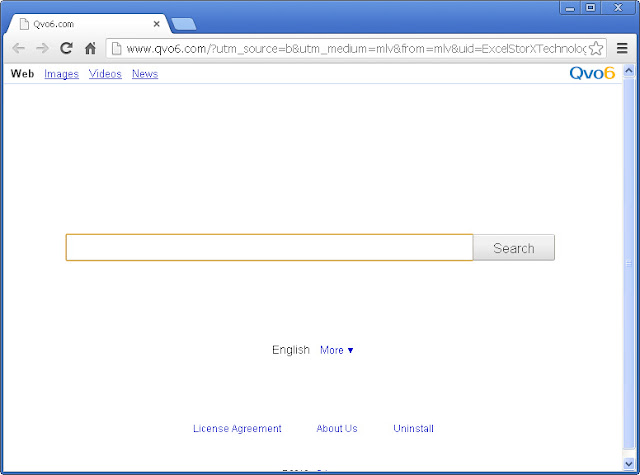
Qvo6.com
Forum rules
Forum Specific Rules
Forum Specific Rules
General Chat. Thats the theme here. Where it wont go anywhere else, it should go here. Everything goes as long as its allowed.
-
Metallifreak

- Stone Cold Poster
- Posts: 3287
- Joined: Tue Jul 19, 2005 4:44 pm
- Location: Graz
- Country: Austria
Qvo6.com
Hey dudes, I don't know why, since yesterday I have always this shitty www.qvo6.com site, when I open my IE. I have already checked on Internet Options, but there is www.google.com as startpage. Does anybody know who to delete this shitty thing? I can't find any files on my HDD with that Name, and I also have checked the add-ons on my IE10 aswell. I also have checked on Google, if there is any way, but all the ways they told didn't help :-(
------------------------------------------------------------------------

------------------------------------------------------------------------
Official Austrian MetClub Chapter Since 1996 * My Trading Page
------------------------------------------------------------------------
------------------------------------------------------------------------
Official Austrian MetClub Chapter Since 1996 * My Trading Page
------------------------------------------------------------------------
-
no leaf clover
- Stone Cold Poster
- Posts: 5350
- Joined: Tue Feb 19, 2008 5:12 pm
- Location: Hellway
- Country: Netherlands
Re: Qvo6.com
I have the same problem.Metallifreak wrote: Hey dudes, I don't know why, since yesterday I have always this shitty www.qvo6.com site, when I open my IE. I have already checked on Internet Options, but there is www.google.com as startpage. Does anybody know who to delete this shitty thing? I can't find any files on my HDD with that Name, and I also have checked the add-ons on my IE10 aswell. I also have checked on Google, if there is any way, but all the ways they told didn't help :-(
-
damageinc

- Stone Cold Poster
- Posts: 3659
- Joined: Fri Jul 06, 2007 7:36 pm
- Location: Bottom of the ocean
- Country: Seychelles
Re: Qvo6.com
Check control panel, then remove programs or whatever it is called in german/english. If it's not there or you can't uninstall it then go to system32 directory in c:\windows maybe it's there and delete it. And use anything but IE!!
-
Metallifreak
- Stone Cold Poster
- Posts: 3287
- Joined: Tue Jul 19, 2005 4:44 pm
- Location: Graz
- Country: Austria
Re: Qvo6.com
Have checked it, it's not there. But will give it an try now with System32. Keep you updated.
Checked too. Nothing to find :-(
------------------------------------------------------------------------
------------------------------------------------------------------------
Official Austrian MetClub Chapter Since 1996 * My Trading Page
------------------------------------------------------------------------
------------------------------------------------------------------------
Official Austrian MetClub Chapter Since 1996 * My Trading Page
------------------------------------------------------------------------
-
damageinc
- Stone Cold Poster
- Posts: 3659
- Joined: Fri Jul 06, 2007 7:36 pm
- Location: Bottom of the ocean
- Country: Seychelles
Re: Qvo6.com
How about checking task manager > running applications? Again, I'm not sure about the proper english name of it, hope you get it.
-
Metallifreak
- Stone Cold Poster
- Posts: 3287
- Joined: Tue Jul 19, 2005 4:44 pm
- Location: Graz
- Country: Austria
Re: Qvo6.com
Nothing aswell

------------------------------------------------------------------------
------------------------------------------------------------------------
Official Austrian MetClub Chapter Since 1996 * My Trading Page
------------------------------------------------------------------------
------------------------------------------------------------------------
Official Austrian MetClub Chapter Since 1996 * My Trading Page
------------------------------------------------------------------------
-
damageinc
- Stone Cold Poster
- Posts: 3659
- Joined: Fri Jul 06, 2007 7:36 pm
- Location: Bottom of the ocean
- Country: Seychelles
-
Metallifreak
- Stone Cold Poster
- Posts: 3287
- Joined: Tue Jul 19, 2005 4:44 pm
- Location: Graz
- Country: Austria
Re: Qvo6.com
Also didn't help to solve my Problem :-(If nothing helps, I think I have to re-setup my PC
------------------------------------------------------------------------
------------------------------------------------------------------------
Official Austrian MetClub Chapter Since 1996 * My Trading Page
------------------------------------------------------------------------
------------------------------------------------------------------------
Official Austrian MetClub Chapter Since 1996 * My Trading Page
------------------------------------------------------------------------
-
vht

- Disposable Hero
- Posts: 292
- Joined: Fri May 17, 2013 6:49 am
- Country: United States
Re: Qvo6.com
Most likely your browser has been hijacked by a virus. You need to go to a forum that specializes in the removal of this type of stuff and follow their instructions for posting some type of log file. Someone should help you and instruct you what you need to do to fix it.
In the meantime, stop using IE to browse porn!
In the meantime, stop using IE to browse porn!
-
Red

- The Unforgiven
- Posts: 301
- Joined: Sat Mar 31, 2012 10:40 pm
- Country: United States
Re: Qvo6.com
Damageinc posted this above.